How to Make a Website From Scratch in 12 Practical Steps
Building a website from scratch is a structured process that turns an idea into a functional online presence. Whether you’re launching a small business, creating a portfolio, or starting a blog, a well-planned site improves visibility, credibility, and conversions. This guide walks you through 12 clear, actionable steps — from defining purpose to promoting and maintaining your site — with practical tips, a comparison table, and prioritized SEO recommendations.
1. Define Your Website’s Purpose
Begin with a concise goal: what should your site accomplish? Common objectives include selling products, generating leads, sharing information, or showcasing work. Your goal determines the tools, content, and structure you need.
Table of Contents
Ask these questions:
- Is the primary objective sales, lead generation, or awareness?
- Who is the target audience and what problems are you solving for them?
- What key actions do you want visitors to take?
Purpose → Features → Ideal For
| Purpose | Typical Features | Ideal For |
|---|---|---|
| Sell products | Product catalog, shopping cart, payment processing, email marketing | Small retailers, entrepreneurs |
| Provide information | Blog/articles, search, contact forms, SEO tools | Bloggers, educators, nonprofits |
| Showcase work | Image galleries, case studies, testimonials | Freelancers, designers, photographers |
| Generate leads | Landing pages, forms, CRM integration | B2B services, agencies |
| Offer services | Booking, client portals, payment integration | Coaches, consultants, tutors |
| Build community | Forums, membership, user accounts | Niche communities, creators |
Tip: Define measurable goals (traffic, conversions, revenue) so you can evaluate progress.
2. Choose a Platform or Development Approach
Select a platform that matches your skills, budget, and scalability needs:
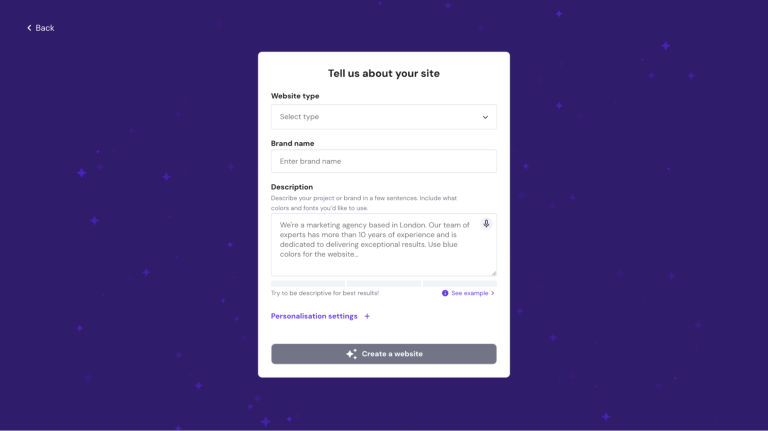
- Website Builders (drag-and-drop): Fast setup, built-in hosting, low technical requirement. Good for beginners.
- Content Management Systems (CMS) like WordPress: Flexible, extensible with themes and plugins, requires hosting and some technical management.
- Custom Development: Full control and scalability; recommended only when unique features or enterprise requirements exist.
What to prioritize when choosing:
- Ease of use vs. customization
- Cost and long-term maintenance
- Available integrations (e.g., ecommerce, analytics)
- Performance and security features
Read Also Article: Best Blessed Friday Web Hosting Deals 2025 | Up to 75% Off
3. Pick and Register a Domain Name
A domain name is your site’s address and a key branding asset.
Best practices:
- Keep it short, memorable, and easy to spell.
- Avoid numbers and hyphens.
- Prefer a
.comif possible, or choose a relevant TLD (e.g.,.store,.tech). - Check trademark conflicts and social handle availability.
Register the domain through a trusted registrar and consider bundling domain registration with hosting to simplify renewals.
4. Secure Reliable Hosting
Hosting determines uptime, speed, and how much traffic your site can handle. Match the hosting type to your project:
| Hosting Type | Strengths | Typical Starting Price |
|---|---|---|
| Shared Hosting | Cost-effective, simple | From ~$1.99/month |
| VPS Hosting | More control and resources | From ~$4.99/month |
| Cloud Hosting | Scalable, high availability | From ~$7.49/month |
| Dedicated Hosting | Maximum control & performance | Premium pricing |
| Managed WordPress | WordPress-optimized, auto-updates | From ~$2.49/month |
Considerations: bandwidth, storage, server location, CDN availability, SSL support, automated backups, and 24/7 support.
5. Plan Your Site Structure
Create a sitemap before you design. A clear hierarchy improves usability and SEO.
Core pages to plan:
- Home
- About
- Services / Products
- Blog / Resources
- Contact
- Legal pages (Privacy Policy, Terms)
Map primary navigation (top-level menu) and secondary pages. Ensure paths to conversions (e.g., contact or buy) are prominent.
6. Design a User-Friendly Layout
Design should reflect your brand and prioritize user experience.
Design checklist:
- Choose a template or theme aligned with your goals.
- Use consistent typography and color palette.
- Make CTAs (call-to-action buttons) clear and visible.
- Use whitespace for readability.
- Ensure accessibility (alt text, readable contrast, keyboard navigation).
Use wireframes or simple mockups to iterate quickly. Conduct small user tests or A/B tests to refine layout choices.
7. Add Essential Pages and Content Types
Every professional site needs core pages and clear content that answers user intent.
Essential pages:
- Homepage: Quick value proposition and primary CTAs.
- About: Story, mission, team credentials.
- Products/Services: Features, benefits, pricing, CTAs.
- Contact: Form, email, phone, social links, map if applicable.
- Blog: For topical content and SEO growth.
- Legal: Privacy Policy and Terms for trust and compliance.
Include testimonials, case studies, and clear service descriptions where appropriate.
8. Add Functional Features and Integrations
Enhance your site with tools that improve conversions and management.
Common features:
- Contact and lead capture forms
- Ecommerce (cart, checkout, payments)
- Booking / scheduling systems
- Email marketing integration (e.g., newsletters)
- Analytics (Google Analytics / Search Console)
- Live chat or chatbot
- Third-party scripts (Facebook Pixel, Google Tag Manager)
Manage third-party integrations carefully to avoid slowing the site.
9. Produce High-Quality Content
Content is central to user engagement and SEO.
Content guidelines:
- Write clear, audience-focused copy that answers user needs.
- Use headings, short paragraphs, and bullet lists for readability.
- Include high-quality images and compress them for speed.
- Provide helpful resources (guides, FAQs) that demonstrate expertise.
- Maintain a content calendar to keep the site fresh.
If you use AI tools for drafts, edit manually to ensure originality and an authentic voice.
10. Optimize for Search Engines (SEO)
Apply on-page and technical SEO to improve discoverability.
SEO essentials:
- Conduct keyword research and use keywords naturally in titles and headings.
- Write unique meta titles and descriptions for each page.
- Use descriptive alt text for images.
- Implement internal linking between related pages.
- Ensure mobile responsiveness and fast load times.
- Install an SSL certificate (HTTPS).
- Create and submit an XML sitemap to Google Search Console.
Regularly audit SEO performance and update content based on analytics.
11. Test Thoroughly and Launch
Before publishing, conduct comprehensive testing.
Testing checklist:
- Cross-browser compatibility (Chrome, Firefox, Safari, Edge)
- Mobile responsiveness across devices
- Functionality checks (forms, payments, links)
- Performance testing (page speed, Lighthouse score)
- Accessibility checks (alt text, keyboard navigation)
- Proofreading and fact-checking
Once tested, publish your site and submit it to search engines for indexing.
12. Promote and Maintain Your Website
Launch is the beginning — ongoing promotion and maintenance drive results.
Promotion strategies:
- Social media distribution and community engagement
- Email newsletters and lead nurturing
- Content marketing (blogs, guides, guest posts)
- Paid campaigns (search ads, social ads, retargeting)
Maintenance tasks:
- Update software/plugins and security patches
- Monitor analytics and conversion rates
- Regular backups and uptime monitoring
- Refresh content and optimize underperforming pages
Comparison: Platform & Hosting Quick Reference
| Need | Recommended Platform | Hosting Type |
|---|---|---|
| Fastest setup, low skill | Website Builder (drag-and-drop) | Shared / Managed |
| Flexibility and plugins | WordPress (self-hosted) | VPS / Managed WordPress |
| High traffic, scalability | Custom development or Cloud CMS | Cloud Hosting / Dedicated |
| Ecommerce focus | WooCommerce / Shopify | VPS / Cloud with CDN |
Conclusion
Creating a website from scratch is a manageable, stepwise process when you start with clear objectives and follow a structured plan. Define your purpose, choose the right platform, secure a domain and hosting, design for users, and apply SEO best practices. After launch, promote your site and perform regular maintenance to sustain growth.
If you’re ready to get started quickly with hosting and domain registration, you may consider solutions that bundle both services to simplify setup. (Affiliate link for a recommended hosting option: https://www.hostg.xyz/SHHx5